
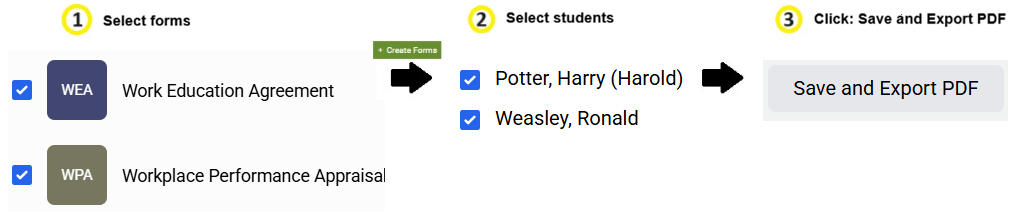
You can create more than one form for more than one student. These steps apply to all forms!
#1: Click on the Forms tab in Hour Republic to create a new form

#2: Click the Create Forms button (top-right)
[this is an option if you prefer to select your students first]

or
Select one or more form(s) that you wish to create [this is an option if you prefer to select your forms first]

#3: Click Create Forms (if you haven’t already)
#4: Select multiple students that you wish to create form(s) for:

#5: Click the Save and Export PDF button (instead of clicking Next)

This accomplishes 2 objectives:
 All documents are automatically created, and once loaded, appear in the main Forms section
All documents are exported and collated into one PDF (this PDF opens up into a new browser tab)